
How to Generate a Channel Analysis Report
This guide provides a straightforward process for generating a Channel Analysis Report, essential for evaluating job performance and optimizing strategies. By following the steps outlined, users can efficiently access and utilize valuable insights from their data. Whether you're a manager or a data analyst, this guide simplifies the reporting process, enabling informed decision-making and improved outcomes. Don't miss the opportunity to enhance your analytical skills and drive better results.
Step-by-Step Process
1. Navigate to Jobs Menu
Go to the Jobs Menu to access your job management dashboard.
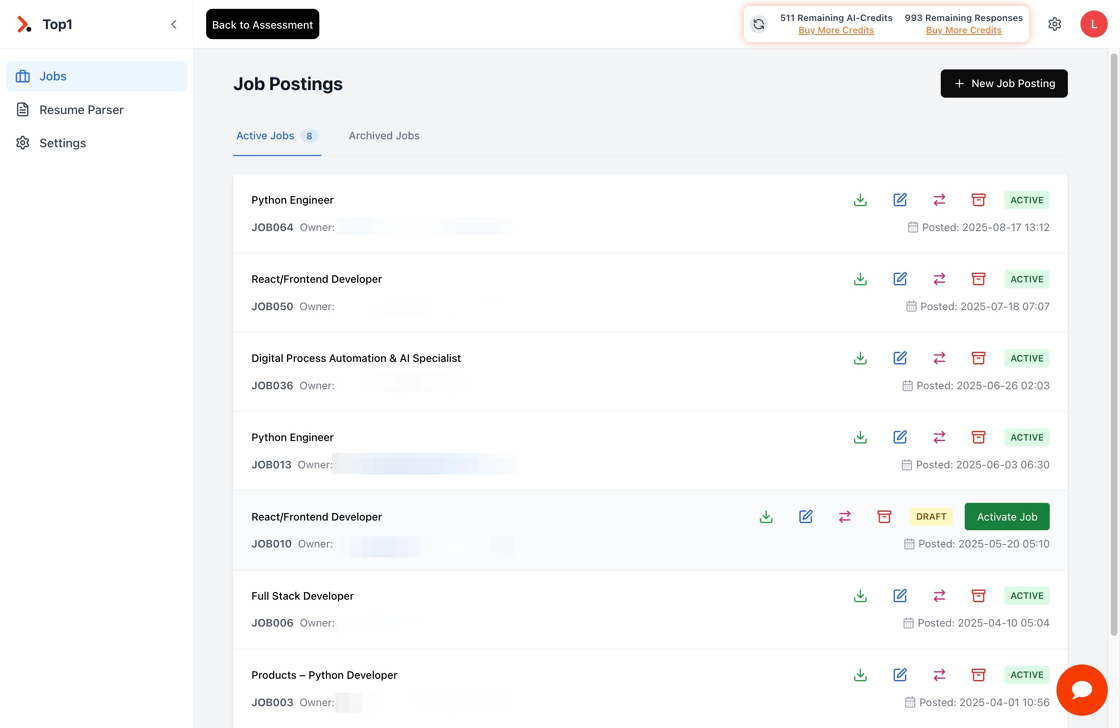
2. Click "Activate Job"
Locate and click the "Activate Job" button to enable the job for analysis.

3. Click "Edit Job"
Access the job editing interface by clicking the "Edit Job" option.

4. Click "Channel Analysis" for Candidate Discovery Insights
Navigate to the Channel Analysis section to access candidate discovery insights and market intelligence.

5. Click "Generate Channel Analysis"
Initiate the channel analysis process by clicking the "Generate Channel Analysis" button.

6. Click "Generate Report"
Complete the report generation by clicking the "Generate Report" button.

7. Review Channel Analysis Insights
Once the Channel Analysis has been successfully generated, click on the "Channels Expand Button" to explore detailed insights for candidate discovery and recruitment strategy optimization.

What You'll Get
The Channel Analysis Report provides valuable insights including:
- Candidate Availability: Understanding where qualified candidates are typically found
- Channel Effectiveness: Analysis of which recruitment channels provide the best results
- Market Intelligence: Geographic distribution and availability of suitable candidates
- Strategic Recommendations: Data-driven suggestions for optimizing your recruitment approach
- Skill Demand Mapping: Identification of high-demand skills and market gaps
Best Practices
- Regular Generation: Run channel analysis reports regularly to stay updated with market trends
- Multiple Jobs: Compare channel analysis across different job postings for broader insights
- Action Planning: Use the insights to adjust your recruitment strategy and channel allocation
- Team Sharing: Share findings with your recruitment team for coordinated strategy implementation
Troubleshooting
- Report Generation Fails: Ensure the job has sufficient data and is properly activated
- Missing Insights: Verify that all required job fields are completed and accurate
- Slow Processing: Channel analysis may take a few minutes depending on job complexity
For additional support with Channel Analysis Reports, please contact our support team or refer to the Top1 App Features documentation.